Before connecting a CG 6565 board to a T1 network, ensure that you have:
Specified NetworkInterface.T1E1[x].Type = T1 for the keyword value in the board keyword file.
Specified NetworkInterface.T1E1[x].Impedance = DSX1 or HIGH_IMPEDANCE for the keyword value in the board keyword file.
Specified the appropriate keyword values in the board keyword file for the following keywords:
NetworkInterface.T1E1[x].FrameType
NetworkInterface.T1E1[x].LineCode
NetworkInterface.T1E1[x].SignalingType
For more information, refer to Configuring the T1 or E1 interface.
Caution: |
You must complete all required performance tests, and a type approval certificate must be granted by the appropriate regulatory authority in the target country before you can connect the CG 6565 board configured as T1 to the public network. |
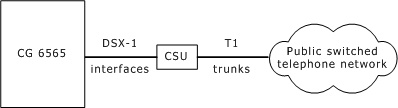
The CG 6565 daughterboard has up to eight T1 trunk interfaces. For typical T1 communications, each trunk interface connects to a channel service unit (CSU) that is connected to a T1 trunk line. The CSU provides a DSX-1 interface to the T1 line and also contains circuitry that allows the central office (CO) to perform diagnostic tests remotely.
The following illustration shows a CG 6565 trunk interface with a CSU:
Note: Trunks synchronize when OAM boots the board.
You can purchase or lease the CSU from the telephone company or other vendor. The CSU must be compatible with DSX-1 specifications.
Warning: |
Important safety note for telephony connections The cables attached to this product must be isolated by a channel service unit (CSU) before the cables leave the building. |
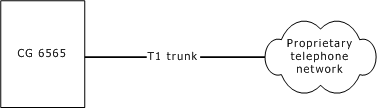
The following illustration shows a CG 6565 trunk interface without a CSU:
To avoid causing T1 service provider alarms, make sure that the board always sends a valid signal, either by looping back at the CSU, or by connecting the CSU to a functioning CG 6565 board. The best way to loop back the signal is to unplug the cable from the CSU. The modular connection on most CSUs loops back the transmit signal to the receive signal when nothing is plugged in.
