Demonstrates a Natural Access client application that passes control of a service object to a peer application. Use takeover to
Operate with a second instance of takeover so that when one instance exits, the second instance continues to perform operations.
Interact with service managers running on remote Natural Access Servers (ctdaemon).
takeover [options]
where options are the following values:
|
Option... |
Use this option to... |
|---|---|
|
-@ host_name |
Specify the name or IP address of the host on which the Natural Access Server (ctdaemon) service managers are running. Default: localhost |
|
-1 |
Specify to run takeover in primary mode. If this option is not specified, the instance with the lowest process identifier (PID) runs in primarymode. |
|
-b board_number |
Specify the OAM board number. Default: 0 |
|
-c host_name |
Specify the name or IP address of the host on which to create the command and checkpoint contexts. Default: localhost |
|
-d name |
Specify the name of the board switching driver. Default: agsw |
|
-e encoding_number |
Specify a voice encoding selector contained in adidef.h, for example, ADI_ENCODE_NMS_32. Default: 3 |
|
-f name |
Specify the name of the voice file used for playing messages. Default: american.vox |
|
-p protocol |
Specify the protocol to run. Default: wnk0 |
|
-r [n:]m |
Specify the called DSP resource [stream and] timeslot. Only required if the -s timeslot is not the same. Default: 16:0 or 4:0. (Board dependent) |
|
-s [n:]m |
Specify the caller line [stream and] timeslot. Default: 0:0 |
|
-v |
Display verbose event output. |
ctaAttachObject, ctaDetachObject, ctaCreateContext, ctaGetObjDescriptor, dtmAttachTrunkMonitor
By using the shared context and the shared object handle capabilities provided in the Natural Access development environment, independently operating applications can share responsibility for overseeing and managing service resources, such as active telephone calls. In such an environment, if one of these applications fails, its cooperating peer can take over responsibility for the control and management of the service resource.
This demonstration program illustrates how applications can share responsibility for the control of Natural Access service objects. This program also illustrates the ability to run contexts on remote Natural Access servers, whereby the application can run on one host and the service managers that are being used by the application can be running on another host.
This program consists of two applications, takeover and takecmd. takeover is the main demonstration program that opens Natural Access services and exchanges checkpoint information with another running instance of takeover. Each instance of takeover is started independently.
Use the second application, takecmd, to control the behavior of takeover. For example, from the takecmd interface, you can tell takeover to start playing a file on a connected call or tell the two instances of takeover to switch roles (the backup instance becomes the primary instance, and the primary instance becomes the backup).
Note: The takecmd interface is similar in style to the ctatest interface. Refer to Interactive test: ctatest for more information about ctatest.
takeover operates either in primary mode or in backup mode. At startup, set the -1 option to indicate which instance of takeover you want to run in primary mode. If the option is not set, an internal algorithm dynamically determines which instance runs in primary mode.
When takeover is run in backup mode, it can request the current state of the primary instance and continue operating from this derived state. That is, the second instance of takeover does not need to be started immediately after starting the primary instance. It is possible to start the primary instance, get it to the state of performing some function such as playing a file, and then start the backup instance of takeover. If the primary instance of takeover then exits, the backup instance continues to play the file, even though it had not been running at the time you invoked the initial command to play the file.
The backup instance receives periodic events or heartbeats from the primary instance. If the backup instance doesn't receive them, it takes over as the primary instance.
takeover prevents more than one instance from running in primary mode, but enables more than one instance to run in backup mode. If the instance of takeover running in primary mode exits, for example, when Ctrl+C is entered, the remaining instances dynamically determine which of the remaining instances will take over the role as the primary instance and make the necessary adjustments.
For independent applications to share the management of service objects, runtime information must be exchanged between the applications at certain times. This exchange of data is referred to as checkpointing. Checkpointing is necessary when a new instance of a service object is created, for example, if you make a call, or if the state of an operation changes.
Cooperating applications can exchange checkpoint information through standard file input/output, shared memory, or a private IPC channel. In this demonstration program, Natural Access application events are used for the exchange of checkpoint information. The use of these events allows for flexibility in the location of the running applications. For example, if a shared memory method is chosen, the running applications must be located on the same server.
The checkpoint information exchanged by an application consists of object descriptors and general state data. The format and content of the information exchanged is specific to the thread performing the exchange.
takeover consists of five threads, each of which operates on a unique, shared context. The following table describes each of the threads and the context on which they operate:
|
Thread |
Context |
Description |
|---|---|---|
|
ccVoice |
TakeOverCcV |
Performs call control and voice operations and sets up switch connections using the NCC, ADI, and SWI services. |
|
checkPoint |
Exchange |
Manages the exchange of checkpoint data with its running peer. This thread is also responsible for generating or monitoring heartbeat events. |
|
dispatchCommand |
TakeCmd |
Hands off events from the takecmd process to the appropriate thread. |
|
manageBoards |
TakeOverOam |
Stops and starts boards using the OAM service. It is also responsible for periodically performing OAM get keyword operations. |
|
monitorTrunks |
TakeOverDtm |
Uses the DTM service to show trunk status information. |
To run the takeover demonstration program, open three windows: one for the primary instance of takeover, one for the backup instance of takeover, and one for the takecmd control program.
By using the command line options for takeover, you can run this demonstration program on two separate Natural Access Servers. One server (-c server_name) can control the TakeCmd and Exchange contexts. These contexts are overhead contexts. When you enter commands at the takecmd prompt, takecmd uses the shared context TakeCmd to transfer command information to the takeover program. The information is transferred through the application events. Similarly, the checkPoint thread uses the Exchange context to exchange data between the primary and backup instances of takeover.
The second server (-@ server_name), indicates where the Natural Access Server (ctdaemon) that controls the service contexts (for example, DTM, OAM, NCC) is running. This server can be a separate computer.
The following procedure assumes that you are testing on a chassis with a CG 6000 board (board 0) and an AG 2000 board (board 7). The AG 2000 has a DID hybrid on port 4 with a 2500-type telephone connected to it.
|
Step |
Action | ||||||||||
|
1 |
Open the first window and enter the following command at the prompt: takecmd This command brings up the application that controls the behavior of takeover. | ||||||||||
|
2 |
Open the second window and enter the following command: takeover -1 -b 7 -s 4 -p wnk0 This command runs the takeover application as the primary instance where:
| ||||||||||
|
3 |
Open the third window and enter the following command: takeover -b 7 -s 4 -p wnk0 This command runs the takeover application as the backup instance where:
|
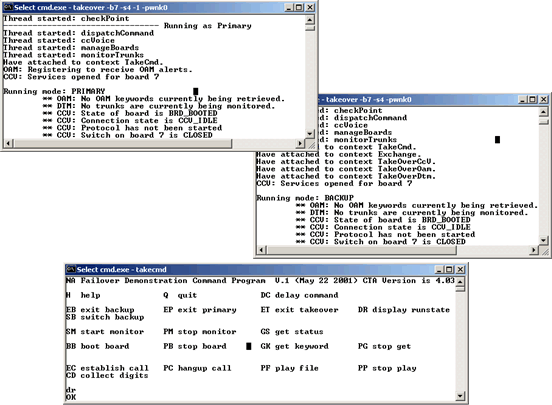
The following illustrations provide an example of running primary and backup applications:
Note: Each instance of takeover reports the threads as they are created. If you enter the command DR, each instance of takeover reports its current runtime state.
You can run this demonstration program in a number of configurations. The following tables provide sample configurations.
Option 1: Four separate hosts named East, West, North, and South.
|
Host |
Start up command |
Description |
|---|---|---|
|
East |
takecmd |
Run the application that modifies the behavior of takeover. This host is currently running Natural Access Server (ctdaemon). |
|
West |
takeover -l -c east -@ south |
Run the primary instance of takeover. The service managers are running on South, and takecmd is creating the command context on East. |
|
North |
takeover -c east -@ south |
Run the backup instance of takover. The service managers are running on South, and takecmd is creating the command context on East. |
|
South |
|
This host is currently running Natural Access Server (ctdaemon). |
Option 2: Three separate hosts named West, North, and South.
|
Host |
Start up command |
Description |
|---|---|---|
|
West |
takecmd takeover -l -@ south |
Run the application that modifies the behavior of takeover. Run the primary instance of takeover. takecmd is creating the command context on localhost (West). This host is currently running Natural Access Server (ctdaemon). |
|
North |
takeover -c west -@ south |
Run the backup instance of takeover. The service managers are running on South, and takecmd is creating the command context on West. |
|
South |
|
This host is currently running Natural Access Server (ctdaemon). |
Option 3: Three separate hosts named East, North, and South.
|
Host |
Start up command |
Description |
|---|---|---|
|
East |
takecmd |
Run the application that modifies the behavior of takeover. This host is currently running Natural Access Server (ctdaemon). |
|
North |
takeover -l -c east -@ south takeover -c east -@ south |
Run the primary instance of takeover. The service managers are running on South, and takecmd is creating the command context on East. Run the backup instance of takeover. The service managers are running on South, and takecmd is creating the command context on East. |
|
South |
|
This host is currently running Natural Access Server (ctdaemon). |
Option 4: One host named West.
|
Host |
Start up command |
Description |
|---|---|---|
|
West |
takecmd takeover -l takeover |
Run the application that modifies the behavior of takeover. Run the primary instance of takeover. takecmd creates the command context. Run the backup instance of takeover. This host is currently running Natural Access Server (ctdaemon). |
Use the following takecmd commands to operate the takecmd and takeover demonstration programs.
|
Function |
Command |
Description |
|---|---|---|
|
Help |
H |
Displays table of available commands within the takecmd interface. |
|
Quit |
Q |
Exits from the takecmd program. |
|
Exit primary |
EP |
Exits from the primary takeover instance. |
|
Exit backup |
EB |
Exits from the backup takeover instance. |
|
Exit takeover |
ET |
Exits from both instances of takeover, as well as takecmd. |
|
Delay command |
DC |
Pauses a specified number of seconds before executing the next command. Use this command when entering commands from a file, and a delay is needed to allow certain takeover states to be reached. |
|
Display runtime |
DR |
Displays the current runtime state of each running instance. |
|
Switch backup |
SB |
Transitions the primary instance to the backup role. The backup instance becomes the primary instance. |
Note: To exit from the takeover instance or to switch run modes, you can use the takecmd commands such as EP, EB, or SB. These commands are useful in scripted input files. In addition, you can exit from a running instance of takeover by closing a window or by entering Ctrl+C.
The following sections describe the three main worker threads in takeover and how to use takecmd to operate them:
DTM worker thread
OAM worker thread
Call control and voice worker thread
These worker threads operate independently. You can issue commands that cause functions to run concurrently, for example, you can request trunk status at the same time that a file is being played.
This thread uses the DTM service to monitor trunks. It maintains a linked list of board and trunk numbers to monitor for takecmd. After receiving DTMEVN_TRUNK_STATUS, the takeover primary instance displays the trunk status information. The backup instance ignores the event. The thread also sets the DTM_START_PARMS parameter field reportmask to 0x7F that reports any change in trunk status at one second intervals.
This thread shows how an application attached to a shared context can be automatically attached to a service object, in this case, a monitored trunk, after receiving a service event. The availability of this automatic attachment is dependent upon the interface provided by the service. In the DTM service, DTMEVN_MONITOR_STARTED provides all applications attached to the context with a unique handle to the monitored trunk object. This handle is contained in the event objHd field.
The backup instance can immediately use the object handle from this event to perform dtmGetTrunkStatus. From this call, it learns the board and trunk number associated with the handle passed in DTMEVN_MONITOR_STARTED. The backup instance then adds an entry to its own list of trunks being monitored.
Whenever the primary instance fails or transitions to the backup role, the backup instance then takes over the role as the primary instance and reports status information for the list of trunks on its list.
Whenever a backup instance is started, it requests current state information from the primary instance. The DTM thread sends all board-trunk values its list of trunks being monitored. The backup instance then performs dtmAttachTrunkMonitor for each entry that it receives and creates its own list entry.
In the following table, the command column lists the two-letter commands to enter at the takecmd prompt. Some commands will prompt for additional information, for example, a board number or trunk number.
Use the following takecmd commands to operate this thread:
|
Function |
Command |
Action |
|---|---|---|
|
Start monitor |
SM Board number Trunk number |
The primary instance calls dtmStartTrunkMonitor. The backup receives DTMEVN_MONITOR_STARTED and extracts the service object handle from the event objhd field. It then calls dtmGetTrunkStatus to determine which board and trunk are being monitored. It adds the new trunk to the list of monitored trunks. |
|
Stop monitor |
PM Board number Trunk number |
The primary instance calls dtmStopTrunkMonitor. |
|
Get status |
GS Board number Trunk number |
Both the primary and backup instances call dtmGetTrunkStatus. It displays the current trunk status. |
The following illustration provides an example of using the DTM service:

This thread uses the OAM service to start and stop boards, as well as to periodically retrieve and display OAM keywords. Currently, the OAM service does not support shared service objects. However, the OAM service can be opened on a shared context facilitating the shared responsibility of managing boards within the system.
This thread illustrates how the OAM service aids in systematically shutting down and starting up a board. It also shows how the clock manager event, CLKEVN_ CONFIGURED, indicates when applications can use a board once the clocks are successfully configured.
In addition, the thread implements logic to periodically retrieve an OAM object keyword. This implementation demonstrates an application's specific need to exchange checkpoint date independent of the Natural Access services being used. In this case, the primary instance informs the backup instance that it will execute oamGetKeyword n times and allow m seconds to elapse between calls. Each time oamGetKeyword is called, the primary instance informs the backup instance. If the backup instance needs to take over the periodic keyword retrievals, it has sufficient information to complete the task.
In the following table, the Command column lists the two-letter commands to enter at the takecmd prompt. Some commands prompt for additional information, for example, a board number or trunk number.
Use the following takecmd commands to operate this thread:
|
Function |
Command |
Action |
|---|---|---|
|
Boot boards |
BB Board name |
The primary instance calls oamStartBoard. The backup instance receives OAMEVN_STARTBOARD_DONE and displays the event information. |
|
Stop boards |
PB Board name |
The primary instance calls oamStopBoard. Before making the call, the OAM thread alerts the other worker threads that the board is about to be stopped and gives them time to make appropriate preparations. The backup instance receives OAMEVN_STOPBOARD_DONE and display the event information. |
|
Get keyword |
GK OAM object name Which Keyword How Often How many times |
The primary instance establishes a loop to read an OAM object keyword
based on the command prompts for an object name, keyword name, how often
to read the keyword, and how many times to read it. |
|
Stop get |
PG OAM object name Which Keyword |
The primary instance stops the loop that is reading OAM keywords and notifies the backup instance that the loop has been stopped. |
The following illustration provides an example of using the OAM service:

This thread uses the Natural Call Control (NCC), ADI, and Switching (SWI) services to illustrate how to use object descriptors to attach to existing service objects. This thread uses object descriptors to attach to a call that is in the connected state and to attach to an open switch handle (SWIHD).
This thread shows how a second application can hand off and control a connected call. In addition, it shows that if a file is being played on the call connection, a second application can continue the play functionality if the primary application exits. To set up calls, takeover uses logic similar to the logic the incta program uses. Refer to Inbound call control: incta for more information.
Whenever a backup instance is started, it requests current state information from the primary instance. The primary instance sends object descriptors for the active call and switch handle. In addition, if a file is playing, current position information is transferred to the backup instance. The position information enables the backup instance to continue play operations even though it was inactive at the time the play operation was started.
In the following table, the Command column lists the two-letter commands to enter at the takecmd prompt. Some commands will prompt for additional information, for example, number of digits.
Use the following takecmd commands to operate this thread:
|
Function |
Command |
Action |
|---|---|---|
|
Establish call |
EC |
The primary instance establishes a call with switch connections based on the -s and -r options. It then waits for an incoming call. When a call is placed on the connection and the call reaches the connected state, the object descriptors for both the call handle and the switch handle are sent to the backup instance. The backup instance uses ctaAttachObject to attach to both the call handle and the switch handle. Other internal data is updated to reflect the connected call. |
|
Hangup call |
PC |
The primary instance hangs up a call. Once the call is disconnected, the switch outputs are disabled and the switch handle is closed. When the backup instance receives the disconnected event, it releases the call handle and detaches from the switch. If a play file is active, all of the associated resources are released. |
|
Play file |
PF |
The primary instance plays a voice file on the call connection. takeover finds and opens the file, reads in a portion of the file based on encoding information, and uses adiPlayAsync to submit and play the first buffer. Subsequent buffers are submitted with adiSubmitPlayBuffer when ADIEVN_PLAY_BUFFER_REQ is received. The primary instance notifies the backup instance that a play file has begun. The backup instance immediately opens the file and continues to maintain the current position in the file based on checkpoint updates from the primary instance. The backup instance is always ready to continue the play if the primary instance fails. |
|
Stop play |
PP |
The primary instance stops playing the file. The primary instance notifies the backup instance to release the resources associated with the aborted play file. |
|
Collect digits |
CD |
The primary instance collects digits in a buffer. The primary instance notifies the backup instance that digit collection has begun. The backup instance prepares to collect the digits. When ADIEVN_COLLECTION_DONE is received, both the primary and backup instances display the buffer of digits collected and release resources. |
The following illustration shows using the Natural Call Control and Voice services:

If a Natural Access Server (ctdaemon) stops running, takeover does not fail. takeover periodically checks to see if the server is running again. When it determines that Natural Access Server (ctdaemon) is active, takeover reestablishes the contexts associated with the server.
The following illustration shows recovering from a server loss:

Natural Access Server (ctdaemon) does not have to be active at the time takeover is started. takeover automatically determines its presence and establishes the contexts.
If the server associated with the takecmd context is not running, takeover is unable to receive commands from takecmd.